Adding Fluid Elegance with a Hand-Drawn Jellyfish PNG
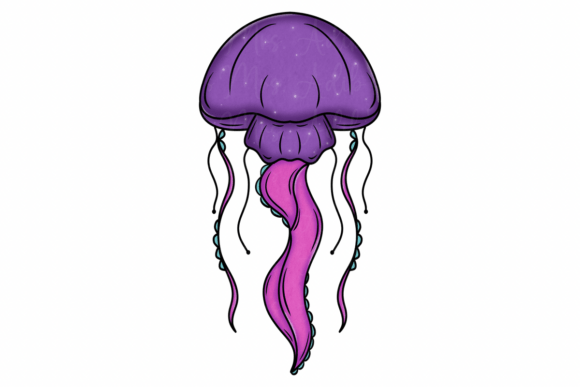
There is a specific challenge in digital design that deals with texture. We often work with vectors and rigid geometric shapes, creating a world that is perfect but perhaps a bit sterile. When you need to introduce organic movement—specifically the weightless, drifting grace of the ocean—a standard stock photo often feels too heavy or literal. This is where the value of a high-quality, hand-drawn Jellyfish PNG becomes immediately apparent. It isn’t just an image of a sea creature; it is a piece of digital artistry designed to capture the fluidity of water itself.
This particular asset stands out because it bridges the gap between illustration and usable graphic design. Because it is hand-drawn, it carries the imperfections and flow of the human hand, which creates a softer, more approachable aesthetic than 3D renders or filtered photographs. The "ethereal grace" mentioned in its description is not just marketing speak; it is a functional design characteristic. The translucent tentacles and soft gradients inherent in this style allow the element to blend seamlessly into complex compositions, acting as a bridge between bold foreground elements and textured backgrounds. For a designer, this means less time masking and more time creating atmosphere.
Practical Applications: From Branding to Education
When we talk about design assets, versatility is the currency of the realm. A Jellyfish PNG with a transparent background is a workhorse for various creative sectors. However, the key to using it effectively lies in understanding the personality of the artwork. This is a "display" element in the truest sense—it is meant to be seen and admired, not necessarily tiled into a repeating pattern like a subtle texture.
For brand identity and logo design, this asset is ideal for businesses that want to convey a sense of calm, mystery, or natural beauty. Think of boutique spas, sustainable seafood restaurants, or wellness apps. The hand-drawn nature of the jellyfish suggests an artisanal, human touch, which is a powerful counterpoint to the digital-first world we live in. However, be cautious with scalability. While the image is high resolution (300 DPI), extremely intricate tentacles can get lost if the logo is reduced to the size of a favicon. Always test your brand identity marks at small scales.
In the realm of web design and social media graphics, the jellyfish serves as a dynamic accent. It doesn't need to be the central focus. Instead, use it to fill "negative space" in a layout. For example, on a landing page, a faded, semi-transparent jellyfish in the background can guide the user's eye toward the "Sign Up" button without cluttering the interface. For content creators on platforms like Instagram or Pinterest, this PNG offers a way to create depth. By layering the jellyfish over text or other images, you create a parallax effect that makes the graphic pop off the screen.
Strategic Typography and Font Pairing
A common mistake when using organic, illustrative assets like a Jellyfish PNG is pairing them with the wrong typeface. Because the jellyfish is fluid, free-flowing, and ornate, your typography needs to provide structure and contrast. If you pair this image with a complex script font or an overly decorative handwritten font, the result will be visual chaos. The viewer won't know where to look.
Instead, I recommend using a clean sans serif font or a modern serif font with high legibility. The goal is to create a visual hierarchy where the typography anchors the dreamy imagery. For instance, if you are designing a poster for an aquarium event, use a bold, geometric sans-serif for the headline information (Date, Time, Location). This "Swiss Style" approach to typography allows the artistic jellyfish to provide the emotion, while the font provides the information. This balance ensures your creative projects look professional rather than amateurish.
Technical Considerations for Professional Results
To truly master the use of this design asset, you need to treat it with the same rigor you would a premium font. The first step is always file management. Since this is a high-quality PNG, the file size might be significant. Ensure you are optimizing the image for web use if you are placing it in a website header to avoid slow load times, which can hurt your SEO.
Color grading is another critical step. Even though the Jellyfish PNG comes with a specific color palette (likely blues and teals), do not be afraid to adjust the hue and saturation to match your specific brand identity. In Adobe Photoshop or Illustrator, using a "Color Overlay" or "Hue/Saturation" adjustment layer clipped to the jellyfish can transform it from a generic ocean graphic into a bespoke brand element. If your brand uses muted earth tones, desaturate the jellyfish to create a sepia-toned, vintage maritime vibe.
Finally, consider the licensing. If you are a graphic designer creating assets for a client, or a small business owner using this for commercial packaging, you must ensure the usage rights cover commercial applications. This specific asset is noted as versatile for both personal and professional use, which is a significant advantage. It allows you to use the same aesthetic for your personal portfolio and your paying client work without legal gray areas.
In summary, the Jellyfish PNG is more than just a picture of an invertebrate; it is a tool for storytelling. By combining its organic, fluid lines with strong typography and strategic placement, you can elevate a standard layout into something that feels immersive and alive. Whether you are designing a website for a marine biologist or creating a mood board for a fashion line inspired by the sea, this asset provides the perfect blend of artistic flair and technical utility.